Image to text for photos, screenshots, and scans
Text inside a picture cannot be searched, copied, or pasted into a spreadsheet. Someone ends up typing it again.
Paxa OCR Lite reads the image and returns its text in reading order, with headings, lists, and tables kept. It reads Thai, English, Chinese, and other languages, and a page that mixes them.
One receipt, read from its image#
A Thai receipt specimen sent as a single image, and the text the model returned for it. The output is the captured response, unedited.
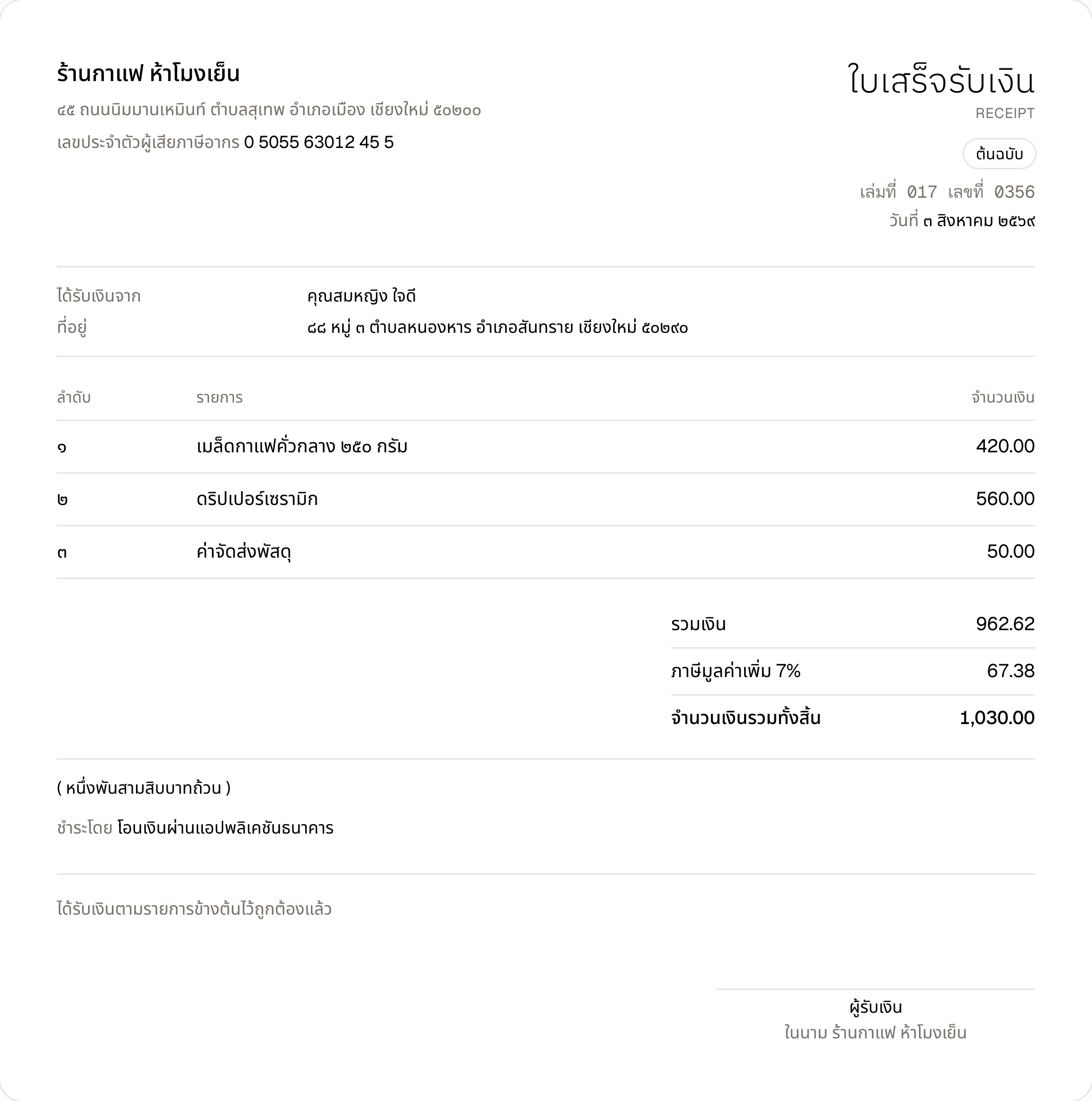
A one-page Thai receipt, typeset as a specimen and sent as a PNG.
# ร้านกาแฟ ห้าโมงเย็น

๕๕ ถนนนิมมานเหมินท์ ตำบลสุเทพ อำเภอเมือง เชียงใหม่ ๕๐๒๐๐

เลขประจำตัวผู้เสียภาษีอากร 0 5055 63012 45 5

# ใบเสร็จรับเงิน
RECEIPT

ต้นฉบับ

เล่มที่ 017 เลขที่ 0356

วันที่ ๓ สิงหาคม ๒๕๖๙

| | |
| :--- | :--- |
| ได้รับเงินจาก | คุณสมหญิง ใจดี |
| ที่อยู่ | ๘๘ หมู่ ๓ ตำบลหนองหาร อำเภอสันทราย เชียงใหม่ ๕๐๒๙๐ |

| ลำดับ | รายการ | จำนวนเงิน |
| :--- | :--- | :--- |
| ๑ | เมล็ดกาแฟคั่วกลาง ๒๕๐ กรัม | 420.00 |
| ๒ | ดริปเปอร์เซรามิก | 560.00 |
| ๓ | ค่าจัดส่งพัสดุ | 50.00 |

| | |
| :--- | :--- |
| รวมเงิน | 962.62 |
| ภาษีมูลค่าเพิ่ม 7% | 67.38 |
| จำนวนเงินรวมทั้งสิ้น | 1,030.00 |

( หนึ่งพันสามสิบบาทถ้วน )

ชำระโดย โอนเงินผ่านแอปพลิเคชันธนาคาร

ได้รับเงินตามรายการข้างต้นไว้ถูกต้องแล้ว

ผู้รับเงิน
ในนาม ร้านกาแฟ ห้าโมงเย็น
[
  {"type":"heading","level":1,"text":"ร้านกาแฟ ห้าโมงเย็น"},
  {"type":"paragraph","text":"๕๕ ถนนนิมมานเหมินท์ ตำบลสุเทพ อำเภอเมือง เชียงใหม่ ๕๐๒๐๐"},
  {"type":"paragraph","text":"เลขประจำตัวผู้เสียภาษีอากร 0 5055 63012 45 5"},
  {"type":"heading","level":1,"text":"ใบเสร็จรับเงิน"},
  {"type":"paragraph","text":"RECEIPT"},
  {"type":"paragraph","text":"ต้นฉบับ"},
  {"type":"paragraph","text":"เล่มที่ 017 เลขที่ 0356"},
  {"type":"paragraph","text":"วันที่ ๓ สิงหาคม ๒๕๖๙"},
  {"type":"paragraph","text":"ได้รับเงินจาก คุณสมหญิง ใจดี"},
  {"type":"paragraph","text":"ที่อยู่ ๘๘ หมู่ ๓ ตำบลหนองหาร อำเภอสันทราย เชียงใหม่ ๕๐๒๙๐"},
  {"type":"table","rows":[["ลำดับ","รายการ","จำนวนเงิน"],["๑","เมล็ดกาแฟคั่วกลาง ๒๕๐ กรัม","420.00"],["๒","ดริปเปอร์เซรามิก","560.00"],["๓","ค่าจัดส่งพัสดุ","50.00"]]},
  {"type":"table","rows":[["รวมเงิน","962.62"],["ภาษีมูลค่าเพิ่ม 7%","67.38"],["จำนวนเงินรวมทั้งสิ้น","1,030.00"]]},
  {"type":"paragraph","text":"( หนึ่งพันสามสิบบาทถ้วน )"},
  {"type":"paragraph","text":"ชำระโดย โอนเงินผ่านแอปพลิเคชันธนาคาร"},
  {"type":"paragraph","text":"ได้รับเงินตามรายการข้างต้นไว้ถูกต้องแล้ว"},
  {"type":"paragraph","text":"ผู้รับเงิน"},
  {"type":"paragraph","text":"ในนาม ร้านกาแฟ ห้าโมงเย็น"}
]
paxa-ocr-lite-v1 · captured Sep 12, 2026
From picture to text#
The Documents tool in the console does this in the browser. The same read is one API request.
Add the image
Drop a PNG, JPEG, or WebP into the Documents tool, or a PDF of up to 50 pages. A file can be up to 10 MiB.
Read it
The text comes back as Markdown, one block per page. A table in the picture arrives as a table, and each row keeps its cells.
Copy or export
Copy the text into a document, or take the structured shape, where headings, paragraphs, lists, and tables are separate typed blocks.
Paxa OCR Lite lists at $6.50 per 1,000 pages. A new account's free credits cover a first read with no card. Pricing lists every plan.
Questions#
How do I convert an image to text?
Open the Documents tool, add the image, and read it. The text appears beside the picture and copies in one click. PNG, JPEG, WebP, and PDF files work, up to 10 MiB.
Which languages can it read from an image?
Thai, English, Simplified Chinese, and other languages, including an image that mixes them, such as a Thai receipt with English product names. There is no language to choose.
Does it keep tables?
Yes. A table in the image comes back as a Markdown table, or as a block that holds its rows as arrays of cells in the structured shape.
Can it read a screenshot or a phone photo?
Both are images, and both are read the same way as a scan. A photo taken straight on in even light gives the model the most to work with.
How do I pull out named fields such as a total or a date?
Use Document Extraction on the same file. You name the fields you want and each comes back filled, with the printed text it was read from.
Is there an API?
Yes. The OCR page covers the request, and PDF to Markdown shows the response shapes.
Start with free credits
Sign in with Google, GitHub, or Hugging Face and spend 100 one-time free credits on your own text.