The fields on a Thai document, typed for you
Free credits on a new account read up to 7 pages, no card required.
A tax invoice comes in and thirteen digits, three dates, and a total in words have to end up in the right columns. Name the fields once. Every document after that fills them in.
- Formats
- PDF, PNG, JPEG, WebP
- Per request
- One document, up to 20 pages
- Per schema
- Up to 100 leaf fields
- Model
- paxa-doc-extract-v1
Reading is the smaller half of the job
The larger half is deciding what each number is. Which of them is the seller's tax id and which the buyer's. Which date is the issue date. Whether the amount in words agrees with the total. That is the work a person does with a highlighter, and the work that stops scaling first.
Paxa Document Extraction takes the schema you write, a list of named fields with a type each, and returns it filled in from the page. A value is the text printed there, read as its type. Where the page has no such value, the field is null and the response says why. Nothing is estimated or looked up elsewhere.
One tax invoice, filled in#
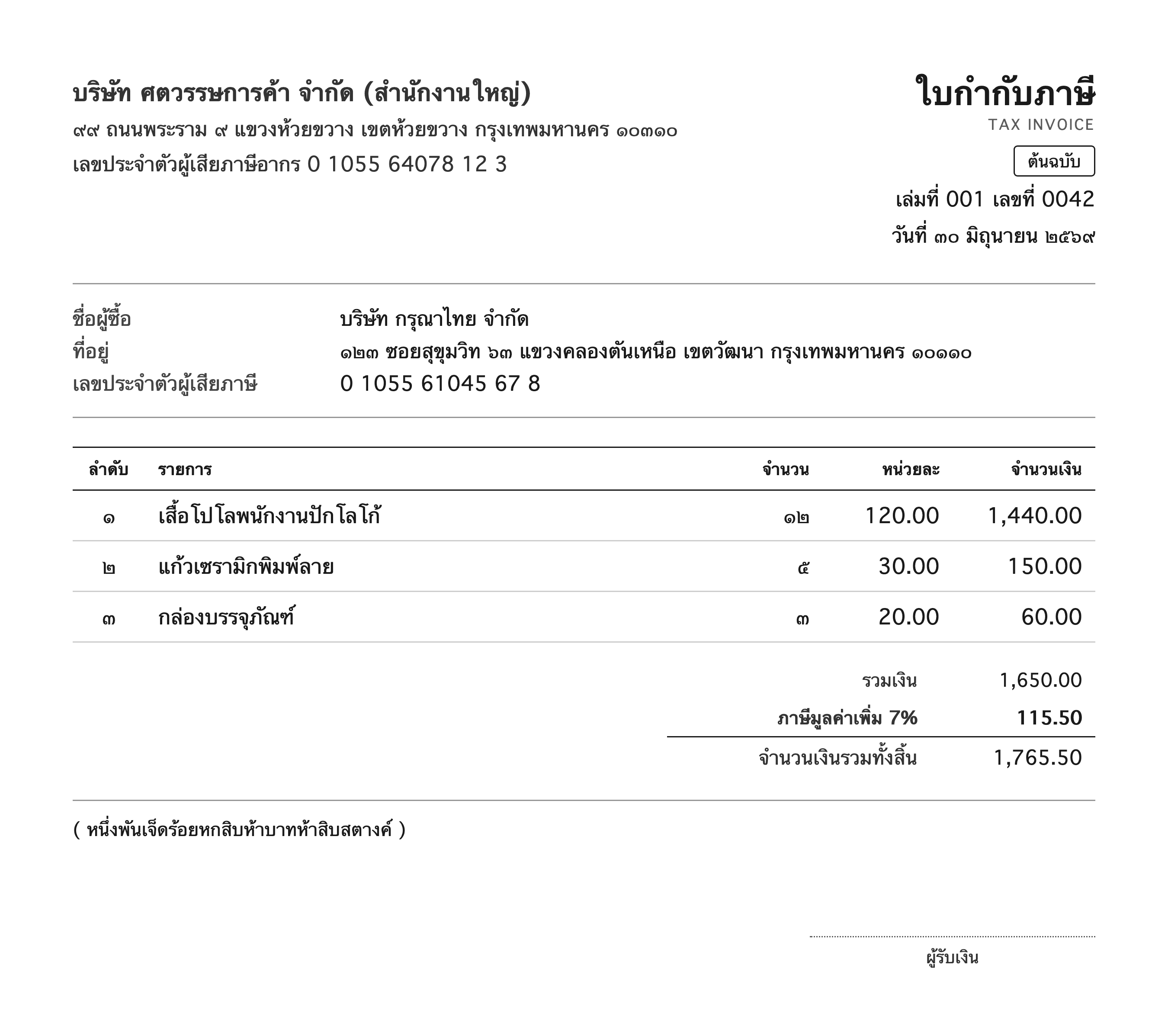
The specimen above is the same Thai tax invoice the OCR page publishes. Below is the model's own response to the tax invoice schema, captured once and shown without edits. Each row is a field the schema named, the value read for it, and what the reading could confirm about it.
seller
- nameบริษัท ศตวรรษการค้า จำกัดread from print
- tax_id0105564078127read from print
as printed: 0 1055 64078 12 7
- address๙๙ ถนนพระราม ๙ แขวงห้วยขวาง เขตห้วยขวาง กรุงเทพมหานคร ๑๐๓๑๐read from print
buyer
- nameบริษัท กรุณาไทย จำกัดread from print
- tax_id0105561045678read from print
as printed: 0 1055 61045 67 8
- address๑๒๓ ซอยสุขุมวิท ๖๓ แขวงคลองตันเหนือ เขตวัฒนา กรุงเทพมหานคร ๑๐๑๑๐read from print
- book_number001read from print
- invoice_number0042read from print
- issue_date2026-06-30read from print
as printed: ๓๐ มิถุนายน ๒๕๖๙
items[0]
- descriptionเสื้อโปโลพนักงานปักโลโก้read from print
- quantity12read from print
as printed: ๑๒
- unit_price120read from print
as printed: 120.00
- amount1440read from print
as printed: 1,440.00
items[1]
- descriptionแก้วเซรามิกพิมพ์ลายread from print
- quantity5read from print
as printed: ๕
- unit_price30read from print
as printed: 30.00
- amount150read from print
as printed: 150.00
items[2]
- descriptionกล่องบรรจุภัณฑ์read from print
- quantity3read from print
as printed: ๓
- unit_price20read from print
as printed: 20.00
- amount60read from print
as printed: 60.00
- subtotal1650read from print
as printed: 1,650.00
- vat115.5read from print
as printed: 115.50
- total1765.5read from print
as printed: 1,765.50
- total_in_words1765.5read from print
as printed: หนึ่งพันเจ็ดร้อยหกสิบห้าบาทห้าสิบสตางค์
paxa-doc-extract-v1 · captured Sep 12, 2026 · unedited
Where the printed span differs from the delivered value, the span is shown under it. The Thai numerals in the addresses were kept as printed, and the tax ids were read from spaced digit boxes into one string.
How a value earns its place#
Three rules decide every field. They are what make the result something a bookkeeping system can act on.
A value is read from print, or it is null.
Every value is a span the model pointed at on the page, then read as its type here. A number that is not printed, a date that is not printed, a name that is not printed cannot appear. The one exception is a classification you list the choices for, such as the kind of document. That one is a choice among your values.
A failed check says why.
A thirteen-digit id with a wrong check digit, an amount below the minimum you set, a date in the future when you said it could not be. Each is returned null with a fixed reason. When you ask for it, the printed span it came from comes too. The reasons are a closed list. A pipeline can branch on them.
Required fields decide whether the result is complete.
You mark the fields the document must carry. The result is complete when every one of them has a value, and incomplete otherwise. A file that is the wrong kind of document comes back incomplete with most required fields missing. The wrong document is detected from what was found on the page.
Types that know Thai documents#
Beside strings, numbers, dates, and your own lists of values, the schema offers types for the things Thai paperwork prints in its own way.
Thirteen-digit identifiers
Personal, juristic, and tax ids, read from spaced boxes or Thai numerals into thirteen digits, with the check digit verified. A misread digit fails the check. The field is returned null, and with evidence on the printed digits come with it. A wrong id that looks right is stopped here.
Dates in the Buddhist era
Day first, the month by number or by any Thai, English, or other printed name, the year in either era. A two-digit year is resolved to the era that puts the date in the recent past. Every such resolution is listed in the response with the digits as printed. You can overrule it from there.
Amounts written in words
The total a Thai receipt prints again in words, read to a number, satang included. Two independent readings of one total, the digits and the words, are the strongest check a receipt offers.
Provinces
The 77 provinces, matched from a full name, an abbreviation, or a code, and delivered in the form you ask for: Thai name, English name, or code.
Banks and insurers
Every bank in Thailand and every licensed insurer, matched from the spellings documents actually print, former names included. Delivered as the short name, the code, or the full name.
Legal forms
บจก., บมจ., หจก., ร้าน, and the rest, matched whether the document abbreviates or spells them out, in Thai or in English.
Documents with a schema ready#
Three Thai documents ship with a schema in the tool. Each page below describes the document itself, field by field, and what the reading has to get right on it.
Tax invoice
Both parties with their tax ids, the book and running numbers, the line items, VAT, and the total in digits and in words.
Receipt
The seller, the payment received, and the line items, in the shorter form a receipt takes.
Withholding tax certificate
Payer and payee, the form the tax was filed under, and the income rows with their amounts and tax withheld.
Questions, answered plainly#
What kinds of document does it read?
Any document you can write a schema for, as a PDF or an image. The specimen here is a tax invoice, and receipts, withholding certificates, forms, and statements follow the same path. The schema says what each field means, and a field is filled only with a span that is that thing.
How do I write the schema?
As a list of named fields, each with a type and an optional line of description the model reads. Objects group fields and arrays hold repeated rows such as line items. The Extract tool starts you on the three ready schemas, and the documentation lists every type and the keys it takes.
Is there a confidence score on each field?
No score is returned. A faithful copy of a misread digit looks certain to any score, and a number that cannot see that error would mislead. What is returned instead is whether each value was read from print, whether it passed the checks its type carries, and whether the required fields are all present.
What happens with a document that is not what the schema expects?
It comes back incomplete, with most required fields listed as missing. That is the signal to route it elsewhere. The request is charged like any other, because the page was read in full.
Can I see where each value came from?
Yes. Ask for evidence and the response maps every field to the printed span it was read from, whether or not a value could be read from it. Ask for the reading and the page text comes back as well, the same reading the OCR endpoint returns.
Does it read Thai numerals?
Thai numerals are read as digits wherever a number, a date, or an identifier is expected, and kept as printed inside text fields. A value that cannot be read as its type is returned null. Nothing is guessed.
What does it cost, and how do I start?
Billing is per page and the rate is on the pricing page. Every new account starts with free credits and needs no card. Open the Extract tool, pick a schema, and drop in a document.
Start with the invoices already on your desk
The free credits on a new account read up to 7 pages. Sign in, open the Extract tool, and see the first one filled in.